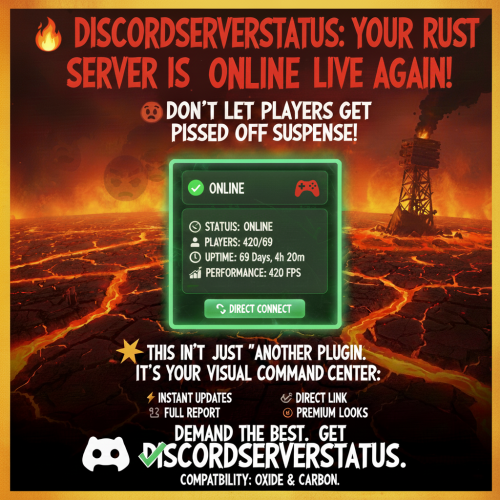
Discord Server Status Plugin: Real-Time Updates & Customization for a Thriving Community
In the dynamic world of online gaming and community management, keeping members informed is paramount. Whether you run a bustling game server, a multi-server network, or a dedicated clan hangout, players crave transparency and immediate information. This is where a robust
Discord Server Status plugin becomes an invaluable asset. Far beyond basic "is it up?" checks, these sophisticated tools transform how your community interacts with your server, delivering beautiful, real-time updates directly to your Discord channels.
Imagine a scenario where your players never have to ask if the server is online, how many people are playing, or if there's any performance lag. A premium Discord Server Status plugin automates this critical communication, fostering trust, reducing support queries, and ultimately enhancing the overall player experience.
Why a Real-Time Discord Server Status Plugin is Essential for Your Community
Effective communication is the bedrock of any successful online community. In the context of game servers, this means proactive updates, not reactive responses. A dedicated Discord Server Status plugin addresses several pain points for both server administrators and players:
*
Building Trust and Transparency: Players appreciate knowing the health of their favorite server. Real-time updates on uptime, player count, and even performance metrics demonstrate a commitment to transparency, building a stronger bond between the server and its community. When players know what's happening, they feel valued and informed.
*
Reducing Support Overload: One of the most common questions for server admins is "Is the server down?" or "How many people are on?" By automating these answers, you significantly reduce the volume of repetitive inquiries, freeing up your time to focus on server development, moderation, or community engagement.
*
Enhancing Player Engagement: Knowing the server is online and how many friends are playing can be a direct motivator for players to join. Conversely, if a server is temporarily offline, a clear status update prevents frustrated login attempts and allows players to plan their gaming sessions more effectively. It ensures your community knows exactly when it's time to hop in and play, fostering a lively environment.
*
Professionalism and Reliability: A well-configured server status message reflects positively on your administration. It signals a professional approach to server management, indicating that you care about providing a stable and reliable experience. This can be particularly important for competitive clans or large public servers aiming to attract and retain players.
*
Addressing Core Discord Status Concerns: While a server status plugin focuses on *your* game server, it's worth noting that Discord itself can sometimes experience outages. Keeping your community informed about your server's status helps differentiate between an issue with Discord and an issue with your game server. If you're experiencing issues with Discord directly, you might want to check its status:
Is Discord Down Right Now? Check Server Status & Outages.
Unveiling the Power: Key Features of a Premium Discord Server Status Plugin
Modern Discord Server Status plugins are packed with features designed to provide comprehensive, customizable updates. They go far beyond simple "online/offline" indicators, offering a rich data stream and unparalleled control over presentation.
Real-Time Data at Your Fingertips
*
Dynamic Player Count & Server Information: Instantly display the current number of players, maximum capacity, and often other critical details like the current map, game mode, or server IP. This is crucial for players deciding when to join.
*
Server Uptime Tracking: Showcase your server's reliability with continuous uptime metrics. This provides concrete evidence of stability, a key factor for attracting and retaining players.
*
Performance Statistics: For administrators, real-time FPS (frames per second) and other performance metrics offer quick insights into server health, allowing proactive troubleshooting. You can often toggle this display for public view or keep it admin-only.
*
Online Player List: Offer a glimpse into who's currently playing, complete with configurable limits to maintain message readability and privacy. This can be a great way to encourage friends to join.
*
Total Connection Counter: Track the cumulative number of connections over time, providing a valuable metric for understanding server popularity and growth.
Superior Message Management & Customization
One of the standout features of advanced Discord Server Status plugins is their intelligent message handling, ensuring your Discord channels remain clean and effective.
*
Edit Mode (Recommended for Clean Channels): This intelligent mode continuously updates the *same* embedded message. It's ideal for a dedicated status channel, keeping clutter to an absolute minimum and providing a single, constantly refreshed source of truth. This approach promotes a tidy Discord experience.
*
New Message Mode: For announcement-style updates or historical logging, this mode creates a fresh message for each update. Crucially, it often includes an optional feature to automatically delete old status messages, preventing your channel from being flooded over time.
*
Auto-Save Message ID: A robust plugin will automatically save the ID of the status message, ensuring that the plugin can continue editing the correct message even after server restarts, eliminating manual configuration headaches.
*
Customizable Update Intervals: From a rapid 15-second refresh to more relaxed intervals, you have full control over how frequently updates are pushed, balancing real-time data with Discord API rate limits and channel activity.
*
Deep Customization for Brand Identity:
*
Custom Embed Colors: Tailor the message colors for online, offline, or warning states to match your server's branding or convey immediate visual cues.
*
Rich Emoji Support: Enhance visual appeal with rich custom emojis or fall back to standard Discord emoji codes, ensuring compatibility across all platforms.
*
Custom Server Descriptions and Footer Text: Add personalized descriptions, server rules, or promotional messages directly within the status embed.
*
Thumbnail and Large Image Support: Visually brand your status message with a custom logo or banner image, making it instantly recognizable.
*
Direct Connect Button: Implement a one-click "Join Server" button within the embed, allowing players to connect instantly without needing to copy and paste IP addresses. This significantly reduces friction.
*
Message Content Before Embed: Add supplementary text or announcements directly above the embed, providing additional context or important notices.
*
Server Name Character Limiting: Ensure clean and concise presentation by automatically limiting the character count of the server name within the embed.
Robust Backend & Reliability
A quality plugin isn't just about pretty messages; it's about stability and maintainability.
*
Comprehensive Error Handling and Logging: Robust systems for identifying and logging issues ensure that administrators can quickly diagnose and resolve any problems.
*
Webhook Validation: Secure webhook validation prevents misuse and ensures that messages are sent reliably to the correct Discord channel.
*
Configuration Migration: As plugins evolve, automatic configuration migration ensures that your settings seamlessly transfer between versions, simplifying updates and future-proofing your setup.
*
Framework Compatibility: Many plugins are designed to work across various game server frameworks (e.g., Oxide, Carbon for Rust servers), offering broad applicability.
*
Automatic Offline Message: In the event of an unexpected server shutdown, the plugin can automatically send an "offline" message, providing immediate notification to your community.
Getting Started: Integrating Your Discord Server Status Plugin
Implementing a Discord Server Status plugin is typically a straightforward process, designed to get you up and running quickly.
1. Install the Plugin
Depending on your game server's framework, you'll generally place the plugin file (e.g., a `.cs` file for Oxide) into the designated plugins folder on your server (e.g., `oxide/plugins`). Always consult the plugin's specific documentation for exact instructions, as steps can vary.
2. Obtain a Discord Webhook URL
This is the bridge between your game server and your Discord channel.
* Navigate to your Discord server settings.
* Click on "Integrations" (or "Apps" then "Integrations").
* Select "Webhooks" and then "Create Webhook."
* Give your webhook a descriptive name (e.g., "Server Status Bot").
* Choose the Discord channel where you want the status messages to appear. It's often best practice to create a dedicated channel (e.g., `#server-status`) for this purpose to keep your other channels clean.
* Copy the generated Webhook URL.
Important Tip: Keep this URL confidential. Anyone with the URL can post messages to your chosen channel.
3. Configure the Plugin
After installing the plugin and restarting your server (or letting it generate its default configuration file), you'll need to edit the configuration:
* Locate the plugin's configuration file (often a `.json` file in your server's configuration directory).
* Open it with a text editor.
* Paste your copied Discord Webhook URL into the designated field within the configuration.
* Now, delve into the extensive customization options:
* Adjust update intervals.
* Set custom embed colors for different server states.
* Enable or disable performance statistics display.
* Configure player list limits, custom footer text, and server descriptions.
* Add your custom thumbnail and banner images.
* Set up the direct connect URL and button text.
* Choose between "Edit Mode" (highly recommended for a clean channel) and "New Message Mode."
* Save the configuration file.
4. Restart Your Server & Enjoy!
Perform a final server restart. The plugin should now initialize, connect to your Discord webhook, and begin sending automated, real-time
Discord Server Status updates directly to your chosen channel. It's a powerful way to
Automate Discord Server Status: Keep Communities Informed Real-Time, making your administrative life easier and your community happier.
Who Benefits Most from a Discord Server Status Plugin?
The utility of a real-time server status plugin extends across various types of communities:
*
Community Discord Servers: Any public or private server looking to keep its members constantly informed about the status of associated game servers.
*
Multi-Server Networks: Operators managing several game servers can configure the plugin to monitor each server, potentially sending updates to different Discord channels for focused monitoring.
*
Server Administrators: For quick health checks and to offload repetitive communication tasks, allowing them to focus on server maintenance and improvement.
*
Clan/Group Servers: Members can instantly see when their main server is online and how many clanmates are playing, coordinating group activities more efficiently.
Conclusion
A premium Discord Server Status plugin is more than just a utility; it's an investment in your community's satisfaction and your server's reputation. By delivering beautiful, real-time, and highly customizable updates, these plugins streamline communication, reduce administrative burden, and foster a more engaged and informed player base. Embracing such a tool transforms the way your community interacts with your server, ensuring everyone is always in the loop regarding your
Discord Server Status. It's a crucial step towards building a transparent, professional, and thriving online environment.